
BIML, where have you been all my life?
I’ve used the BIDS Helper Visual Studio add-on for years now, and I’ve seen and heard of BIML, but it’s one of those things I’ve never needed to look into any further than that. Until I discovered that it’s something that would’ve saved me hours of tedious SSIS work!
What is it?
BIML (Business Intelligence Mark-up Language), or more specifically, BIMLScript, is sort of a mashup of XML and C# code nuggets, allowing you to create SSIS and SSAS packages. This is very much the condensed “DBDave” version – check out the official site for a much more eloquent explanation of what it is.
Basic Example
When you open up your SSIS project in Visual Studio, if you’ve got BIDS Helper installed, then when you right-click on the project you have the option of adding a BIML file:
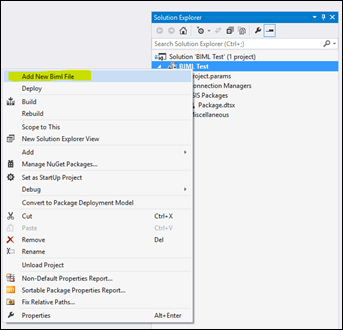
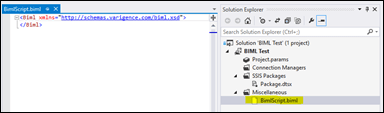
It’ll create a new file under “Miscellaneous” in your project. Go ahead and open it up and you’ll see something like this:
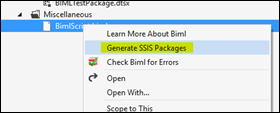
You can “execute” a BIMLScript by right-clicking on it, and selecting “Generate SSIS Packages”:
Now we can jump in the deep end and paste the following into this new BIML script:
`


2016-01-01

tempdb

localhost

false

tempdb

localhost


 @[$Project::SourceDatabase]
 @[$Project::SourceServer]


 @[$Project::DestinationDatabase]
 @[$Project::DestinationServer]


 !(@[$Project::DoTruncate])


 TRUNCATE TABLE dbo.DWDestinationTableExample;


 SELECT * FROM dbo.DWSourceTableExample WHERE KeyDate >= ?;


`
What the… ?!?
Yeah, okay, let’s step through this to figure out what it does. I’ll show you what each bit of code results in too, which might help make it more tangible/understandable:
`


    `
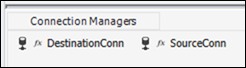
First we setup the connections that will exist within the package. These are just connections to tempdb on my local SQL instance for testing. This bit results in this:
Next up, we specify the project and some project parameters that we’re going to use within the package:
`


2016-01-01

tempdb

localhost

false

tempdb

localhost


`
There are some gotchas regarding project parameters in BIML when using BIDS Helper to check and run your BIMLScript, so keep that in mind. As per this example , you need to specify the project parameter definitions in here, even if they already exist within your project.
So because of these issues, I found it simpler just to make sure the parameters already exist, like this:
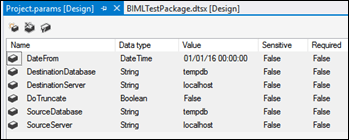
Now we create the package itself, and substitute in some of the package parameters, which in this case we’re using to replace parts of the connection strings for our source and destination connections.
`

@[$Project::SourceDatabase]
@[$Project::SourceServer]

@[$Project::DestinationDatabase]
@[$Project::DestinationServer]

`
This is the same as this part in the user interface:
Finally we add the meat to this SSIS sandwich; the components that perform the actual transformation and/or loading of data.
`

!(@[$Project::DoTruncate])

TRUNCATE TABLE dbo.DWDestinationTableExample;

SELECT * FROM dbo.DWSourceTableExample WHERE KeyDate >= ?;

`
We’ve got an “Execute SQL” component running a truncate of the destination table first. However, we only want this to run if we’ve set our project parameter “DoTruncate” to true.
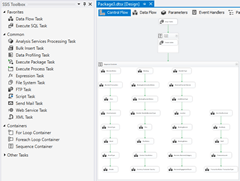
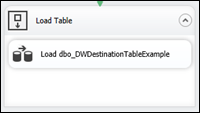
And lastly a Data Flow task to move data. This is done using a SQL query with a parameter for a “KeyDate” column, as an illustration of what you might do in a real-life situation.
Cool! Now what??
So that’s BIML in a very small nutshell. Even if that’s all you’re doing with it (i.e. creating pretty basic packages) I think it’s worth doing since it makes source control of your packages SOOOOOO much nicer!
Imagine getting a pull request from a developer who’s made some SSIS changes, and simply being able to diff the BIML scripts to see exactly what they’ve changed!? 😊
But wait, there’s more…
In the scenario that lead to discover BIML, I wanted to create a “dynamic” SSIS package, that was driven by metadata stored in a database. In other words, I could maintain a table with a list of table names that I wanted “ETL’d” from my production system to my data-warehouse, and my magic SSIS package would pick up changes, new tables added, etc without me needing to open and edit one monstrous package.
This is where the power of BIMLScript and it’s C# nuggets really shines. It lets you drop in complicated logic in C# code to control and mould the output of the BIML. So you could look up a list of tables to load, then iterate over that list, creating packages per table. Check out this post for a lot more detail (and examples) on how to achieve this.
That’s it for now. There’s lots of more detailed examples around if you look for them (Google is your friend), and I just wanted to highlight the possibilities which I didn’t realise were there before. Hopefully you find it as useful as I did.
Cheers, Dave